PaperJoy · Research workspace
“My team was drowning in papers. We were practically sharing them on USB drives. We had to figure out a better way, and East of Oakwood helped us do exactly that. They worked with us to figure out what we needed, even when we didn’t quite know ourselves. The speed of the first version blew our minds. It felt practically real-time.”
A small research team needed a better way to manage academic papers. We built PaperJoy around their research process, with paper discovery, reading, notes, and project planning in one application.
Once the team started using it, some features they’d asked for turned out to be less useful than expected. We removed those and improved the ones they used most. Trying the app helped them decide what they needed.
Built for a small team
We built the paper interface, project spaces, and reading tools around the group’s research habits. Their feedback guided the changes as they started using the app.
Paper discovery
Researchers can find papers referenced in their existing documents, search academic sources, and retrieve available PDFs. The application keeps the connection to the source material, so they can see where a reference came from.
A connected library
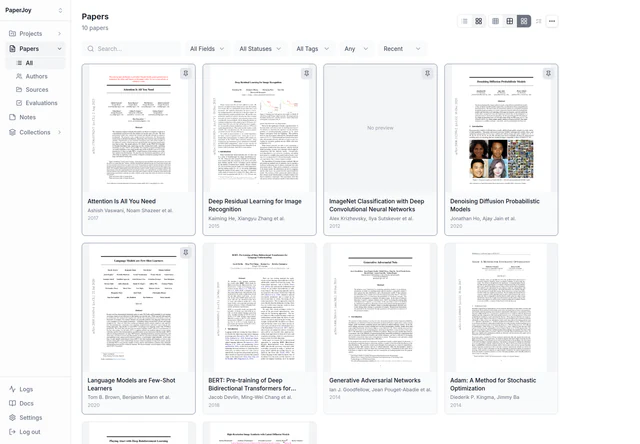
Papers have searchable metadata, tags, ratings, and visual previews. Collections help the team organize related material, while version tracking keeps different copies of a paper together.
Research projects
Project spaces connect papers and notes with the tasks they support. Boards and timelines help researchers plan their work, and a shared view of tasks shows what needs attention across projects.
Notes in context
Reading notes and observations stay alongside the relevant paper or project. Researchers can return to an idea with its source and the surrounding work still connected.
AI assistance
AI is connected to the research workflow: it can help find and download papers, analyze their contents, extract authors and other metadata, and produce summaries. Local models run through Ollama, with researchers' own notes kept distinct from AI-generated material.
A built-in paper reader
Researchers can open PDFs directly in the application and keep reading notes alongside the paper. The reader connects the document with its metadata and the research it supports, so reading and recording an idea happen in the same workspace.
Refined through real use
Working with the application helped the researchers see which features they actually needed. We removed the ones they weren't using and simplified what remained, using their feedback to shape each round of changes.
See PaperJoy in action
Read the walkthrough description
This silent, 23-second demonstration shows the research workspace:
- The paper library displays document previews in a grid, with titles, authors, and publication years. Layout controls switch how the library is displayed.
- Typing “atten” into the search field filters the library to Attention Is All You Need.
- Opening that paper shows its title, authors, rating, publication date, downloaded status, identifiers, tags, processing stages, and a summary describing the Transformer architecture.
- The Projects view lists research projects with their papers, tasks, tags, status, and creation dates.
- The demonstration returns to the paper library in a table layout.
Inside the research workspace
Let’s build it.
Have a project in mind, or want help figuring out where AI fits? Tell us a little about it.